How to build a remote patient monitoring system
How readings get from a device at home to a clinician who acts on them, the rules for monitoring software, and an order to build it in.
What a remote patient monitoring system does
A remote patient monitoring (RPM) system collects readings from devices patients use at home, such as blood pressure cuffs, glucose meters, scales and wearables, and puts them in front of a care team that reviews them and acts.
The value is not in collecting data. It is in making sure the right reading reaches the right person in time, that reviews are recorded, and that patients keep using the device.
The modules you need
Most teams need all of these in the end. The phased plan below sets the order.
Enrolment
Patients enrolled with consent, a care plan, thresholds and the devices they will use.
Device data intake
Readings from cellular devices, phone apps and device clouds, normalised with units and times.
Alerts and risk sorting
Readings checked against each patient's thresholds and trends, sorted so the riskiest come first.
Care team worklist
A queue of patients to review, with history, notes and quick actions.
Patient app
Readings, reminders, education and messages, built for people who are not keen on apps.
Escalation
Clear paths to a nurse, a doctor or emergency services, with every escalation logged.
Time and activity tracking
Review time and interactions recorded, where billing or reporting needs them.
How the parts fit together
- 01
Device adapters
One adapter per device type or cloud, so a new device does not change the core.
- 02
Time-series store
Readings stored with device, time zone and quality flags, kept apart from clinical notes.
- 03
Rules engine
Thresholds and trend rules set by clinicians per programme and per patient, with versions.
- 04
Worklist service
Turns alerts into tasks with owners and due times.
- 05
Integration layer
Summaries and readings back to the EHR so the monitoring does not sit in a silo.
Data model sketch
- 01
Patient and programme
The patient, their condition programme, consent and care plan.
- 02
Device
Device type, serial, assignment dates and last contact.
- 03
Reading
Value, unit, time, device and any quality flags.
- 04
Threshold and rule
Per-patient limits and the rule version that produced each alert.
- 05
Alert, review and escalation
Who reviewed what, when, what they decided and who it went to.
Systems it has to talk to
- 01
Device makers and clouds
Cellular devices, Bluetooth via the patient app, and device vendor APIs.
- 02
Phone health platforms
Readings from the phone's health data store, with the user's permission.
- 03
EHR
Patient lists in, summaries and readings out, over FHIR or HL7 v2.
- 04
Messaging
SMS, calls and push for reminders and outreach.
Rules to design for
Which rules apply depends on your market and product.
- 01
Medical device rules
Software that monitors physiological processes is often a medical device, class IIa or higher under the EU MDR's Rule 11.
- 02
Health data protection
HIPAA, the GDPR and national health laws, with agreements with device vendors.
- 03
Billing rules
Where RPM is reimbursed, the payer sets what counts as a billable day or review.
- 04
Clinical responsibility
Clear rules on response times and who is responsible for acting on a reading.
From prototype to production
Build in this order so something real is in users' hands early.
- 01
Clickable prototype
The care team worklist and the patient app, tried with real clinicians and patients.
- 02
First programme live
One condition, one or two devices, thresholds, alerts and logged reviews.
- 03
EHR and billing
Integration with the EHR and time tracking for reporting or billing.
- 04
More programmes
More conditions and devices, trend rules and programme reporting.
What drives the cost
These decide most of the budget. For a number based on your own scope, use the cost tool. OceanLab bills $30-50/hr or per milestone.
- 01
Device types
Each device or device cloud needs an adapter and testing.
- 02
Medical device work
If the software is a device, the quality system and documentation add effort.
- 03
Alert logic
Per-patient thresholds and trend rules need clinical input and testing.
- 04
EHR integration
How easily patient lists and summaries can move to and from the EHR.
- 05
Patient support
Device setup and connection help for patients at home.
Product builds that match this guide
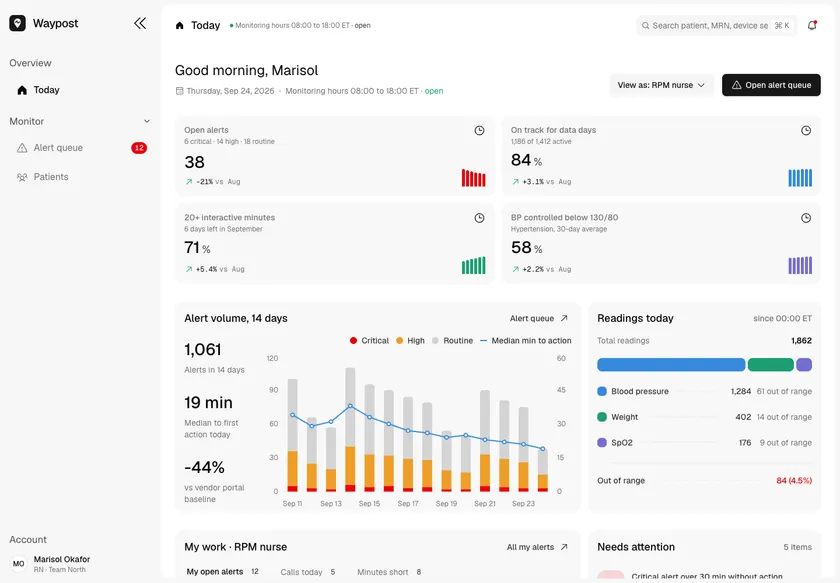
Waypost - Remote Patient Monitoring Platform with Risk-Sorted Alerts
Designed and built a clickable remote patient monitoring platform for a US cardiology and primary care group: home blood pressure, weight and SpO2 readings from cellular devices, a risk-sorted alert queue for nurses, triage with the practice's protocol on screen, and live progress toward each patient's Medicare RPM billing requirements.
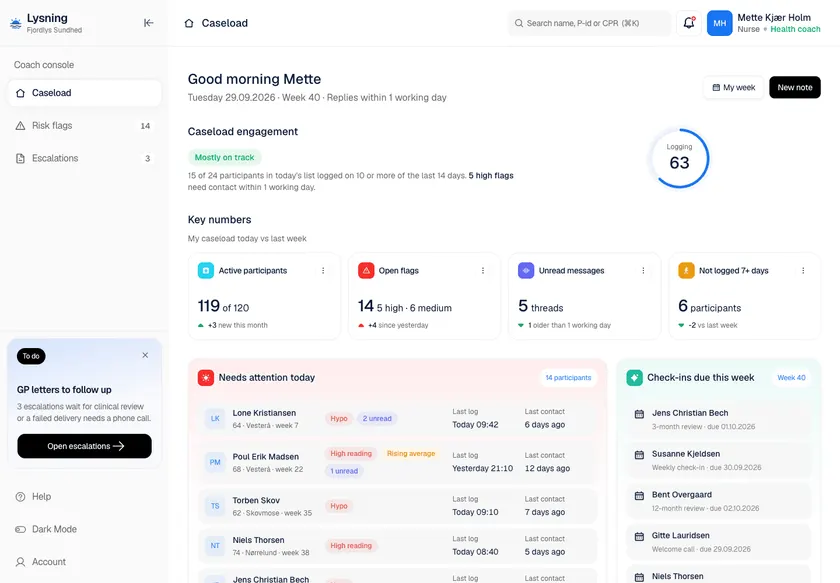
Lysning - Type 2 Diabetes Programme with a Coach Console and GP Escalations
Designed and built a clickable coach console for a Danish type 2 diabetes programme that municipalities buy for their residents: a caseload sorted by risk, rule-based flags with a service standard, a full participant record, and letters to GPs that go through clinical review and MedCom delivery.
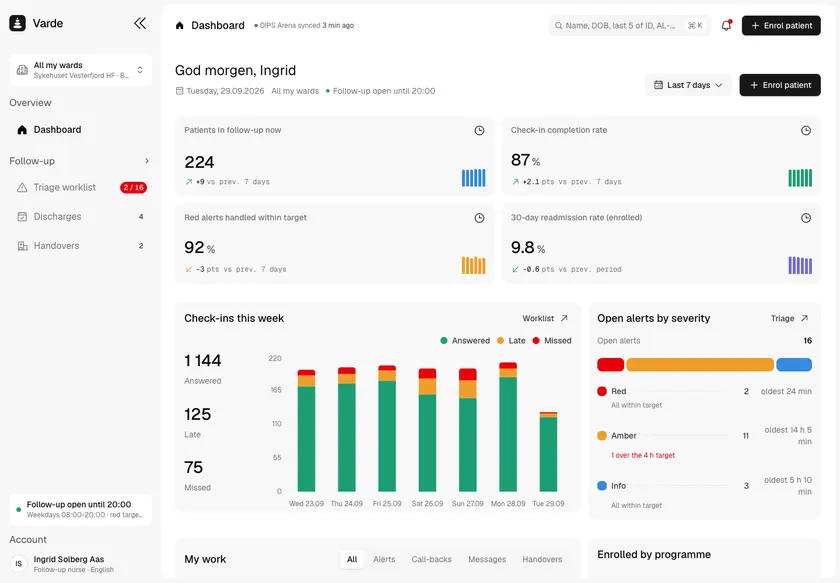
Varde - Discharge Follow-up Platform with Nurse Triage and Municipal Handover
Designed and built a clickable discharge follow-up platform for a Norwegian health trust's cardiology and orthopaedic wards: patients enrolled at discharge answer check-ins on their phone, answers that cross a programme threshold land on a nurse triage worklist, and handovers go to the GP or municipal home nursing as standard messages over Norsk Helsenett.
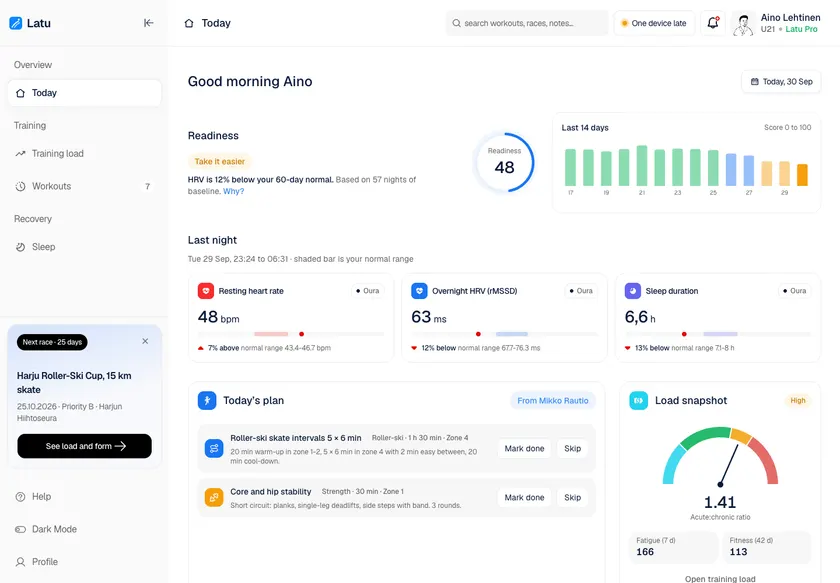
Latu - Wearable Data Dashboard for Endurance Athletes and Coaches
Designed and built a clickable athlete app for a Finnish sports-tech company that joins heart rate, HRV, sleep and training load from several wearables: a daily readiness score that explains itself, training load and fatigue charts, every workout in one list with duplicates merged, and sleep trends against the athlete's own normal range.
Two ways to work with OceanLab
Project build
We design and build the system as one project. It starts with a clickable prototype your team tries before any production code is written. Pay per milestone (outcome-based) or hourly at $30-50/hr, depending on role and seniority.
Embedded engineers
Our engineers join your team on a flexible monthly retainer. Part-time is fine and it runs month to month, with hours that overlap the US, UK and Europe, the Middle East, and Australia and Asia. Outcome-based or $30-50/hr.
Questions
How do you stop alert fatigue?
Per-patient thresholds, trend rules instead of single readings, sorting by risk and grouping repeat alerts. Clinicians tune the rules and every change is versioned.
Is RPM software a medical device?
Often, because it monitors physiological processes. It depends on what the software does with the readings and what you claim, so classify it early.
Which devices should we start with?
The ones your first programme needs and your patients can use. Cellular devices that work without a phone are often easiest for older patients.
