Waypost - Remote Patient Monitoring Platform with Risk-Sorted Alerts
Remote Patient Monitoring for a US Cardiology and Primary Care Group
Designed and built a clickable remote patient monitoring platform for a US cardiology and primary care group: home blood pressure, weight and SpO2 readings from cellular devices, a risk-sorted alert queue for nurses, triage with the practice's protocol on screen, and live progress toward each patient's Medicare RPM billing requirements.
Most of our work is under NDA. Per agreement, we can share the work but not the company details - all names and identifying information shown here have been changed.
Impact
Today dashboard, alert queue, alert triage, risk-sorted patient list and patient chart. Every one of the 24 demo alerts opens its own triage page and all 26 patients open their own chart.
Including a possible crisis at 180/120 or above, systolic 160 or above twice in 24 hours, and heart failure weight gain of 3 lb in 24 hours or 5 lb in 7 days. Each alert shows the threshold applied and whether it came from the protocol or a patient override.
Critical within 30 minutes, high within 4 hours and routine by the next business day. An alert's age turns red in the queue once it passes its target.
90 days of readings per patient, 24 alerts across every alert type, devices, calls, time entries, messages and notes, with 10 staff users across 9 clinics.
The Problem
Brightwater Ridge ran its RPM programme for about 1,400 patients on a device vendor's portal, a spreadsheet of who had which cuff and nurses' handwritten call notes. The portal flagged every reading outside one fixed range, so nurses faced 300 or more alerts a day and started skimming them. Nobody knew which patients had reached 16 days of readings or 20 minutes of interactive time until the month was over, and call notes never reached the EHR.
Our Solution
Waypost gives the care team one place to monitor home readings. Alerts fire from per-patient protocol thresholds and are sorted by priority and risk, nurses triage with the protocol steps and the patient's trends in view, every minute on a call is timed and marked interactive or not, and each patient's chart shows how close they are to each billing code this month.
The Challenge: Monitoring That Holds Up Clinically and for Billing
RPM only works if nurses act on the right readings in time, and the practice can only bill for it if data days, minutes and interactive contact are documented exactly as Medicare requires.
Alert Fatigue From One Fixed Range
A single range for every patient raised hundreds of alerts a day. Thresholds have to follow the patient's own protocol and targets, merge repeat readings for the same patient, and separate a possible hypertensive crisis from a 7-day average just above goal.
Billing Rules That Count Days and Minutes
CPT 99454 historically needs at least 16 days of device data in 30 days, 99457 the first 20 minutes of management in a calendar month with at least one real-time call or video, and 99458 each extra 20 minutes. Manually typed readings and text messages do not count.
Not an Emergency Service
RPM does not watch readings around the clock. The product has to show monitoring hours, give patients the 911 instruction on a crisis-range reading, and never imply 24/7 cover.
Protected Health Information Everywhere
Readings, notes and messages are PHI under HIPAA. Every vendor needs a business associate agreement, SMS carries no clinical detail unless the patient opted in, and every alert action, threshold change and time entry must be audited.
Our Approach: From RPM Rules to a Clickable Platform
Spec and Rules Research
Mapped 10 roles from RPM nurse and medical assistant to billing specialist, patient and caregiver, 35 screens (28 staff and 7 patient app screens) and the data model for patients, consents, protocols, alert rules, care plans, devices, readings, alerts, escalations, time entries and billing periods. Wrote down the rules the design follows: Medicare RPM codes and supervision rules, FDA device status, consent and cost sharing, HIPAA, the ACC/AHA blood pressure guideline and WCAG 2.1 AA for the patient app.
Clickable Demo on a Production UI Kit
Built 5 key staff screens on a production dashboard kit: Today with KPIs, 14-day alert volume and a role switcher for each user's work, the alert queue with tabs, filters, grouping per patient and bulk actions, alert triage with the triggering readings, a 14-day chart with the alert band and the triage form, the patient list sorted by risk, and the patient chart with billing progress, devices, consent and trends. The Call button runs a shared timer shown in the top bar.
What a Production Build Adds
Integration with the device vendor feed (such as Tenovi, Smart Meter or BodyTrace), the EHR over FHIR R4 and HL7v2 (such as Epic or athenahealth), insurance eligibility checks, Twilio calls and SMS under a BAA, shipping labels and e-signed consent. Staff SSO, an append-only audit log, and the remaining screens: data gaps, care plans, provider review, enrolment, devices and shipments, time and billing, reports, compliance, settings and the patient app.
Why It Works: The Right Patient First, Every Minute Counted
Patients, Not Readings
Several alerts for the same patient collapse into one row with a count, sorted by priority and then age. A nurse claims the patient, opens the quick view from the row and goes to triage in one click.
Protocol Guidance at the Point of Triage
The triage page shows the readings that fired the alert with the threshold and its source, a 14-day chart with the alert band shaded, the patient's medications and last visit, and the protocol steps for that alert type, such as the symptoms to ask about for heart failure weight gain.
Billing Progress Visible Before Month End
Each chart shows data days against 16, interactive minutes against 20 and total minutes against 40, with each code's status in plain words such as 2 min short. The patient list shows the same numbers so nurses can reach patients while there is still time.
Trends With Their Context
Blood pressure is charted against the patient's own target band, with a crisis band and medication changes marked on the time axis, a morning and evening split, and weight shown as 24-hour and 7-day change for heart failure patients.
Related case studies
View all: Telehealth & patient apps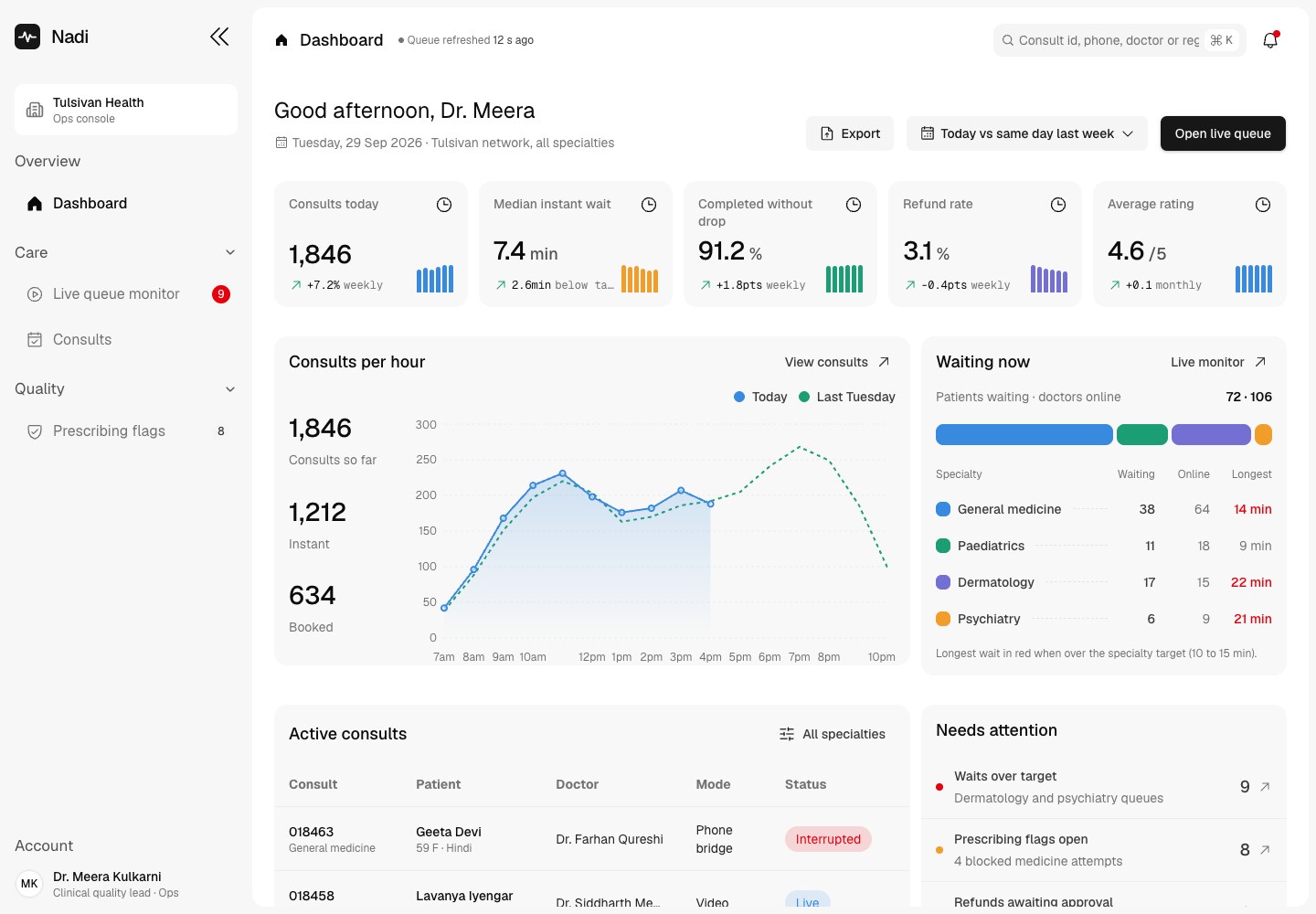
Nadi - Video Consult Platform with Guideline-Aware Prescribing
Designed and built a clickable ops console for an Indian telemedicine provider's video consult platform: a live queue across four specialties, every consult with its guideline evidence and signed e-prescription, refunds within role limits, and prescribing flags raised when a doctor tries a medicine the Telemedicine Practice Guidelines do not allow.
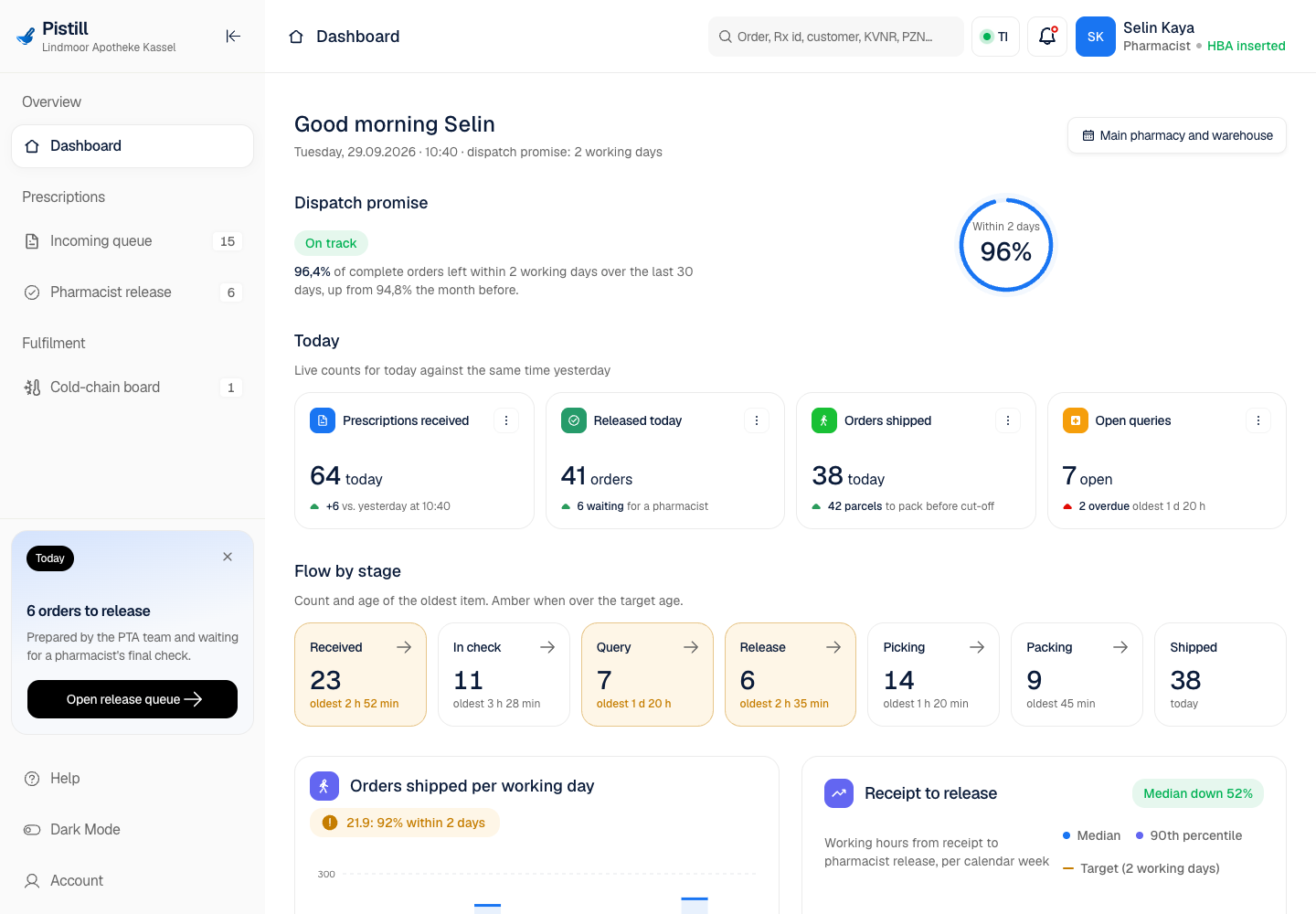
Pistill - E-Rezept Redemption, Pharmacist Release and Home Delivery Console
Designed and built a clickable pharmacy operations console for a pharmacist-owned group in northern Hesse with a mail-order permit: one queue for E-Rezepte from every channel, a validation workbench with substitution and co-payment rules, a pharmacist release step, and a cold-chain board for fridge medicines.
Enterprise Software Engineering - Human + AI
Contact Us
© 2026 - Copyright. All Rights reserved Oceanlab
Location
Global Headquarters
21 Merchant Road, 3rd Floor, Singapore 058267
Main corporate office and leadership operations
North America Office
548 Market Street, PMB 12345, San Francisco, CA 94104
Client operations and business development
India Office
402 Shivalik Shilp II, SG Highway, Ahmedabad 380015
Engineering and delivery center

Enterprise Software Engineering - Human + AI
Contact Us
Locations
Global Headquarters
21 Merchant Road, 3rd Floor, Singapore 058267
Main corporate office and leadership operations
North America Office
548 Market Street, PMB 12345, San Francisco, CA 94104
Client operations and business development
India Office
402 Shivalik Shilp II, SG Highway, Ahmedabad 380015
Engineering and delivery center
© 2026 - Copyright. All Rights reserved Oceanlab