How to build a pharmacy management system
What a pharmacy system needs, from safe dispensing to batch-level stock and controlled drug registers, the rules behind it, and an order to build it in.
What a pharmacy management system does
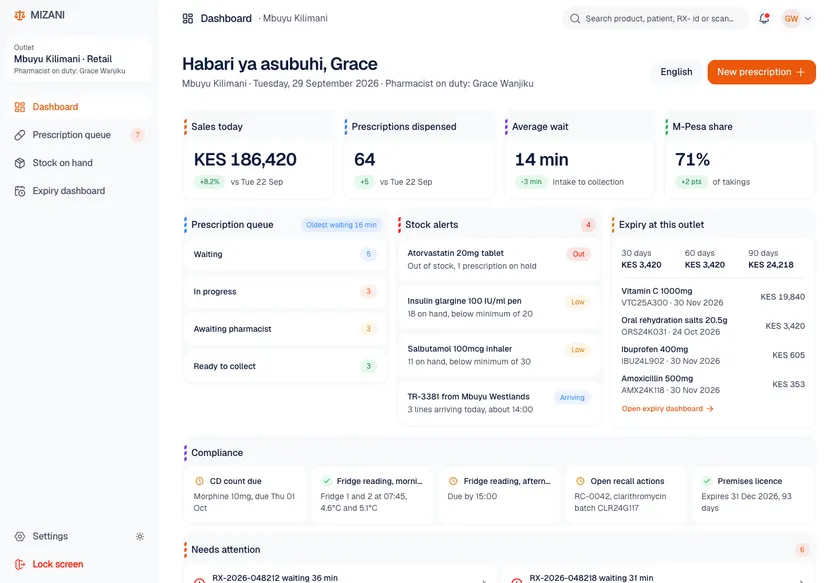
A pharmacy management system runs a pharmacy or a chain: receiving prescriptions, checking and dispensing them safely, keeping stock by batch and expiry, recording controlled drugs, billing insurers and selling over the counter.
For chains it also moves stock between branches, sets prices centrally and shows what is selling, expiring or running out across every site.
The modules you need
Most teams need all of these in the end. The phased plan below sets the order.
Prescription intake
Paper, electronic and repeat prescriptions in one queue.
Clinical checks
Interaction, allergy and dose checks, with the pharmacist's decision recorded.
Dispensing
Barcode checks at picking and labelling, so the right item and batch go to the right patient.
Batch and expiry stock
Stock by batch and expiry at each branch, with first-expiry-first-out and recalls by batch.
Controlled drugs register
Every movement of controlled medicines recorded and reconciled.
Point of sale
Over-the-counter sales, receipts and tax, linked to stock.
Insurance claims
Claims to insurers and national schemes for dispensed items.
Chain operations
Central pricing, transfers between branches and reporting across sites.
How the parts fit together
- 01
Stock ledger by batch
Every stock change is an entry with item, batch, branch and reason, so counts can always be explained.
- 02
Offline-capable branches
Branches keep dispensing and selling when the connection drops, and sync safely after.
- 03
Clinical rules service
Drug database checks behind one interface, with overrides recorded.
- 04
Central catalogue and pricing
One product master and price list pushed to all branches.
- 05
Integration layer
E-prescriptions, insurers, tax systems and suppliers behind adapters.
Data model sketch
- 01
Product and batch
Items with barcodes, batches, expiry dates and storage needs.
- 02
Stock movement
Receipts, dispenses, sales, transfers, returns and write-offs.
- 03
Prescription and dispense
What was prescribed, what was dispensed, checks done and by whom.
- 04
Controlled drug entry
Register entries with balances, witnesses and reasons.
- 05
Sale and claim
Receipts and claims to payers, linked to the dispense.
Systems it has to talk to
- 01
E-prescription services
National or regional e-prescription systems.
- 02
Drug databases
Interaction and dosing data from a licensed source.
- 03
Insurers and national schemes
Eligibility and claims for dispensed items.
- 04
Tax and invoicing
Electronic tax invoicing where the country requires it.
- 05
Suppliers
Orders, deliveries and invoices from wholesalers.
Rules to design for
Which rules apply depends on your market and product.
- 01
Pharmacy and medicines law
Who may dispense what, record-keeping duties and pharmacist supervision, set by national law.
- 02
Controlled drugs
Registers, storage and reporting for controlled medicines.
- 03
Pharmacovigilance
Adverse reactions reported to the medicines regulator.
- 04
Health and payment data
Patient data under health privacy laws, and card data under PCI DSS at the till.
From prototype to production
Build in this order so something real is in users' hands early.
- 01
Clickable prototype
Dispensing and stock screens, tried by pharmacists in a real branch layout.
- 02
First branch live
Dispensing with checks, batch stock, controlled drugs register and point of sale.
- 03
Claims and e-prescriptions
Insurer claims and electronic prescriptions.
- 04
Chain rollout
More branches, transfers, central pricing and group reporting.
What drives the cost
These decide most of the budget. For a number based on your own scope, use the cost tool. OceanLab bills $30-50/hr or per milestone.
- 01
Number of branches
Rollout, training, hardware and offline sync.
- 02
Payer integrations
Each insurer or scheme has its own claims process.
- 03
E-prescription certification
Connecting to national services often needs certification.
- 04
Data migration
Moving stock, patients and history from the old system.
- 05
Hardware
Barcode scanners, label printers and tills.
Product builds that match this guide
Two ways to work with OceanLab
Project build
We design and build the system as one project. It starts with a clickable prototype your team tries before any production code is written. Pay per milestone (outcome-based) or hourly at $30-50/hr, depending on role and seniority.
Embedded engineers
Our engineers join your team on a flexible monthly retainer. Part-time is fine and it runs month to month, with hours that overlap the US, UK and Europe, the Middle East, and Australia and Asia. Outcome-based or $30-50/hr.
Questions
Can branches keep working offline?
Yes, if it is designed in. Branches dispense and sell from local data and sync when the connection returns, with conflicts resolved by clear rules.
How do you handle recalls?
Because stock is tracked by batch, a recall finds every affected unit in stock and every patient it was dispensed to.
Do you build for single pharmacies or chains?
Both, but the design differs. Chains need central catalogues, transfers and group reporting from the start.
