Kleidi - SaaS Admin Console with Consented Support Access and a Full Audit Trail
Back-Office Console for a Greek Hotel Software Company
Designed and built a clickable internal admin console for an Athens SaaS company that sells housekeeping software to EU hotels: find any tenant and see everything about it on one page, enter a customer's workspace only with their consent, work GDPR data requests on the clock, and give staff elevated rights only for a limited window with someone else's approval.
Most of our work is under NDA. Per agreement, we can share the work but not the company details - all names and identifying information shown here have been changed.
Impact
Home, tenant search, a Tenant 360 with 7 tabs for each of the 24 tenants, support access with 6 tabs and data requests, inside an app shell with the environment strip, search and elevation requests.
Elevated rights such as revealing personal data need someone else's approval and last at most 4 hours. Break-glass is capped at 60 minutes and needs an open incident and an on-call lead as second approver.
Due dates run from receipt, turn amber at 7 days and red at 3, and can be extended once by up to two further months. Deletions need a second approver.
Hotels in 6 countries, each with properties, 12 tenant users and 12 Stripe invoices, plus 14 staff, 18 support sessions (3 break-glass), 18 data requests, 3 incidents and 4 plans.
The Problem
Myrtaki grew from 40 to 900 hotel tenants in three years and its back office never caught up. Support agents answered tickets by running SQL against a read replica, engineers shared one superadmin login, and plan changes were made by editing rows by hand after a Slack message. When a large Spanish hotel group asked for a list of every Myrtaki employee who had accessed its data in the last year, the company could not produce it, and the same week a former housekeeper's erasure request sat in a shared inbox for five weeks.
Our Solution
Kleidi is the one console Myrtaki's staff use behind the scenes: tenant search and a Tenant 360 with users, plan and entitlements, Stripe billing, feature flags and audit; support access that waits for the customer's consent; GDPR data requests with their deadlines; and elevated rights granted just in time. Every write asks for a reason code and a ticket or incident reference and lands in the audit trail.
The Challenge: Staff Access You Can Account For
Inside each tenant sit housekeepers' names, shifts and photos and guest names on room notes. Myrtaki's staff need that context to help hotels, but every look and every change has to be scoped to a role, justified, approved where it matters and recorded.
Shared Logins and Raw SQL
Support worked from a database replica, engineers shared one superadmin account and plans were edited by hand. Nobody could say who had looked at a hotel's housekeeper records last month, or why.
Processor for Someone Else's Data
For the personal data inside a tenant, the hotel is generally the controller and Myrtaki its processor under GDPR Article 28, acting on the tenant's documented instructions. For its own customer contacts, Myrtaki is the controller. Each request has to be handled in the right capacity.
Deadlines on Every Request
Access, erasure and portability requests must generally be answered within one month, extendable by two further months for complex cases with notice. At the end of a contract the tenant's data must be deleted or returned. A shared inbox could not keep that clock.
Evidence for Customers and Auditors
SOC 2 and ISO/IEC 27001 audits generally look for least privilege, and Myrtaki's contract says staff enter a tenant's workspace only with a tenant admin's consent, except break-glass during a declared incident. Both need a record that shows who, when, why and with whose approval.
Our Approach: From Access Rules to a Clickable Console
Spec and Rules Research
Mapped 9 staff roles plus the tenant admin, 30 screens (28 staff console screens and 2 customer-facing pages) and the data model for staff, versioned roles and permissions, elevation bundles, tenants, tenant users, plans, entitlement grants, Stripe billing snapshots, flag overrides, support sessions and consents, incidents, data requests and a hash-chained audit trail. Wrote down the rules the design follows: GDPR controller and processor duties, data subject deadlines, breach notice to controllers, least privilege for SOC 2 and ISO/IEC 27001, customer consent for support access and billing kept read-only from Stripe.
Clickable Demo on a Production UI Kit
Built 5 key screens on a production dashboard kit, in light and dark: home with KPIs, my queue and needs attention, tenant search with saved views and a quick view panel, the Tenant 360 with lock and unlock, support access requests, incident notes, entitlement grants and a masked user panel with reveal, support access with request, start, end and break-glass, and data requests with verify, extend and complete. Every write opens the reason prompt and is added to the tenant's audit list.
What a Production Build Adds
The product's internal admin API for tenants, users, locks and impersonation tokens, staff SSO and MFA with Okta or Microsoft Entra ID, read-only Stripe, Zendesk or Intercom tickets, PagerDuty or Opsgenie, ClickHouse usage, the feature flags service, Postmark or Amazon SES email, Slack approvals and S3 export links in eu-central-1. Plus the remaining screens: plans, entitlement grants, billing watchlist, usage, flag overrides, account locks, incidents, break-glass reviews, elevation requests, the audit trail, reports, settings and the two customer-facing pages for consent and request status.
Why It Works: Every Action Has a Name and a Reason
Production Is Never in Doubt
A strip above every page reads PRODUCTION in red, and turns amber with the permission, tenant and minutes left while an elevation is active, with a Drop elevation button. Staff always know where they are and what extra rights they hold.
Personal Data Masked by Default
Tenant users' names and emails show as m****@hotel-****.gr. Revealing one needs the pii.reveal permission and a reason code, lasts 10 minutes and is recorded as a sensitive view in the audit trail.
Consent Before Entry
A support access request names the scope (whole tenant, one property or one user's view), the mode, the reason, the ticket and a window from 15 minutes to 24 hours, and sends the consent email to the tenant's owners and admins. Break-glass has its own red tab with incident, approver and review status.
One Page Instead of a Query
The Tenant 360 shows key facts with the VIES check, the health score and the factors behind it, rooms cleaned per day, open items, plan and entitlements with their source, Stripe billing marked read-only, resolved feature flags and the latest audit entries, so nobody needs the database.
Related case studies
View all: Internal tools & ops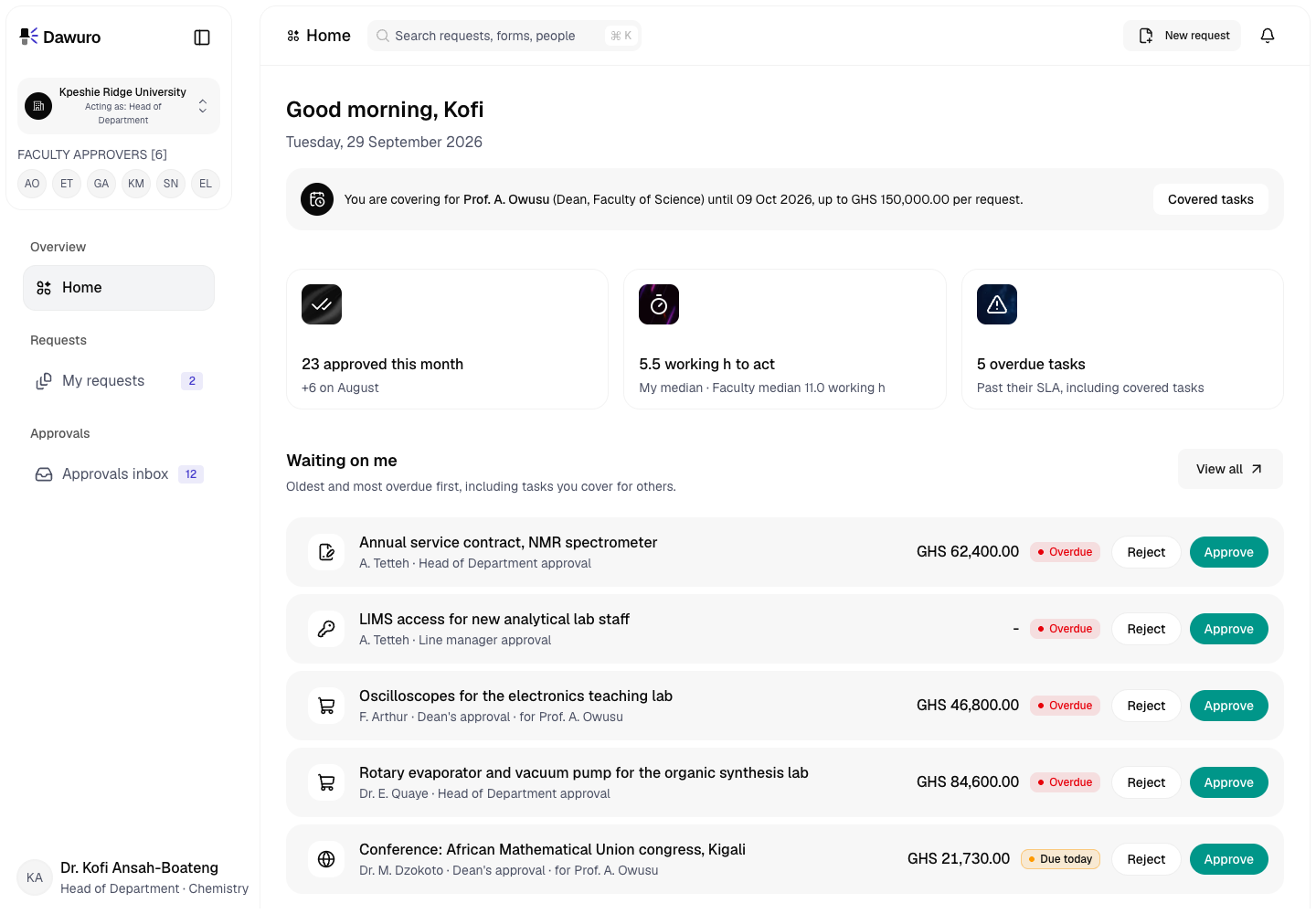
Dawuro - Approval Workflow Engine for a Ghanaian Public University
Designed and built a clickable approval workflow engine for a public university in Accra: request forms routed by amount, cost centre and the department hierarchy, an approvals inbox and two-tap decision screen designed phone first, delegation and out-of-office cover, and a route and history on every request that shows who approved what, and when.
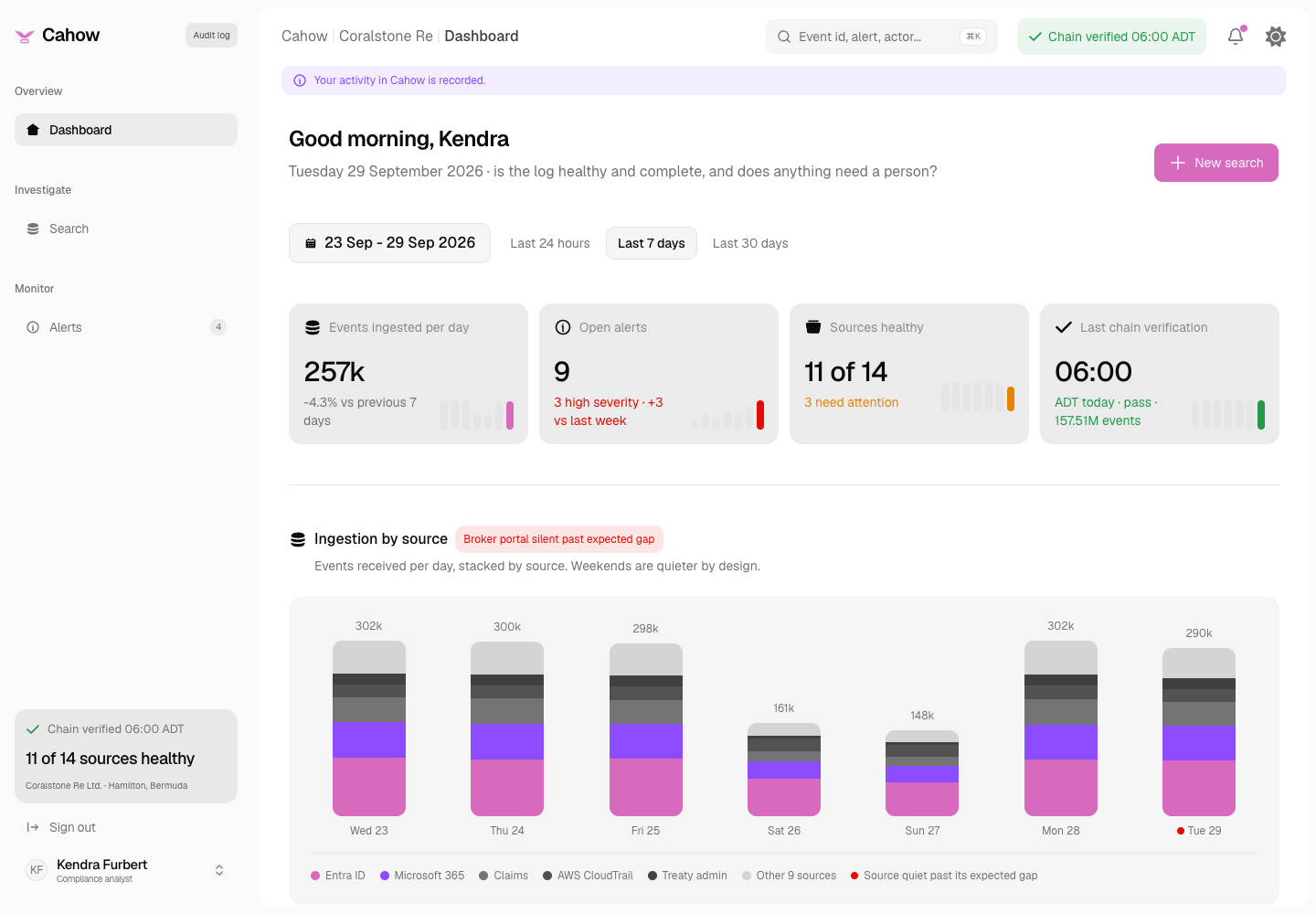
Cahow - Tamper-Evident Audit Log and Viewer for a Bermuda Reinsurer
Designed and built a clickable audit log viewer for a Bermuda property and casualty reinsurer: every internal system sends its events to one hash-chained store, and compliance, security, internal audit and legal search them, follow a person or a record, triage unusual behaviour and prove nothing was changed.
Enterprise Software Engineering - Human + AI
Contact Us
© 2026 - Copyright. All Rights reserved Oceanlab
Location
Global Headquarters
21 Merchant Road, 3rd Floor, Singapore 058267
Main corporate office and leadership operations
North America Office
548 Market Street, PMB 12345, San Francisco, CA 94104
Client operations and business development
India Office
402 Shivalik Shilp II, SG Highway, Ahmedabad 380015
Engineering and delivery center

Enterprise Software Engineering - Human + AI
Contact Us
Locations
Global Headquarters
21 Merchant Road, 3rd Floor, Singapore 058267
Main corporate office and leadership operations
North America Office
548 Market Street, PMB 12345, San Francisco, CA 94104
Client operations and business development
India Office
402 Shivalik Shilp II, SG Highway, Ahmedabad 380015
Engineering and delivery center
© 2026 - Copyright. All Rights reserved Oceanlab