Tekmė - No-Code Workflow Automation Builder with AI Steps
Workflow Automation SaaS for EU Operations Teams
Designed and built a clickable no-code automation builder for a Vilnius SaaS startup selling to EU operations teams: a node canvas with branches, error paths and AI steps that classify, extract, summarise or act as an agent, a cost estimate per run, and a run history where every step is recorded with personal data masked.
Most of our work is under NDA. Per agreement, we can share the work but not the company details - all names and identifying information shown here have been changed.
Impact
Home, workflows, the workflow editor with node configuration and test run panels, run history and run detail with the step inspector. Every one of the 34 demo runs opens its own run detail.
Supplier invoice intake classifies the email, extracts 9 invoice fields, sends bills over €5,000 for Slack approval and books the rest in the ERP, with a low-confidence path to AP triage and an error path to an exceptions log.
Emails, names, phone numbers, IBANs and personal codes are masked in every step's input and output. Reveal asks for a reason, is logged and expires after 10 minutes; authorisation headers always show as [secret].
18 workflows in 6 folders for a Kaunas logistics customer, 34 runs across 6 statuses, 6 members and a price list of 4 AI models, 3 processed in the EU and 1 outside the EEA.
The Problem
Vilkupis Labs' target customers glued their tools together with scripts one engineer wrote, a US automation tool whose run logs showed full customer emails to anyone in the account, and people copying data between tabs. Adding an LLM made it worse: prompts sat in scripts with API keys in plain text, nobody knew what an AI step cost until the invoice arrived, failed runs at 02:00 simply lost the data, and buyers' security teams wanted a DPA, a sub-processor list, EU hosting and a SOC 2 report before they would sign.
Our Solution
Tekmė lets an operations lead build and own an automation on a node canvas, test it with sample data, see what it will cost per run and publish it with a second person's approval. Every run is recorded step by step with personal data masked, failed steps are retried and then parked in a dead-letter queue, and IT and the DPO can see what each workflow touches, which model it uses and where the data goes.
The Challenge: Automation People Can Trust
An automation tool sits in the middle of a customer's email, CRM, ERP and payments, and now sends that data to AI models too. The people who build workflows, the people who watch them and the people who answer for the data all need different things from the same product.
Personal Data in Every Run
The customer is the controller and Vilkupis Labs the processor under Article 28 GDPR. Run history must still be useful for debugging without showing names, emails, IBANs or personal codes to everyone who can open a run, and payloads need their own retention.
AI Steps With Unknown Cost and Location
Each AI step has a model, a price per token and a processing location. Models outside the EEA need a transfer mechanism such as the SCCs or the EU-US DPF, and under the EU AI Act Vilkupis Labs is generally a provider while customers using AI steps are deployers.
Failures That Lose Data
Apps rate-limit, tokens get revoked and AI output does not match the expected fields. Without retries, error paths and a place where failed runs wait, a step that fails overnight drops the invoice or the customer email it was carrying.
Secrets and Changes Without Control
OAuth tokens and API keys must be encrypted and never shown again, never written to logs or put into prompts. A builder's edit to a live workflow must not change production silently, and some customers require a second person to approve every publish.
Our Approach: From Automation Rules to a Clickable Builder
Spec and Rules Research
Mapped 9 roles from workspace owner to the vendor's trust and compliance lead, 32 screens across the workspace, the vendor console and public pages, and the data model for workflows, versions, triggers, runs, step executions, AI calls, dead-letter items, connections and usage meters. Wrote down the rules the design follows: GDPR processor duties and sub-processor notice, international transfers, the EU AI Act provider and deployer split, OAuth 2.0 with PKCE, signed webhooks, SOC 2, the EU Data Act on switching and EU VAT.
Clickable Demo on a Production UI Kit
Built 5 key screens on a production dashboard kit, with the kit's pipeline canvas turned into the workflow graph: Home with KPIs, a live run graph and needs-attention items, the workflows table, the editor with branch, low-confidence and error paths, AI node setup, a cost estimate chip, validation and a Request publish flow, run history with live updates and a quick view, and run detail with the path taken, attempts, masked input and output, AI details and agent tool calls. All actions run on local state.
What a Production Build Adds
The execution engine with retry policies and the dead-letter queue, connectors through OAuth with secrets in AWS KMS, AI steps through Anthropic, OpenAI and Mistral with EU-processed options on AWS Bedrock or Azure OpenAI, PII detection with Microsoft Presidio, Stripe Billing with VIES VAT checks, WorkOS SSO and SCIM, and an append-only audit log. Then the remaining screens: versions and compare, triggers, forms, connections, AI models and budgets, workspace settings, the vendor console and the trust centre.
Why It Works: Every Run Accounted For
Cost Known Before Publishing
The editor's toolbar shows estimated operations and AI cost per run from the nodes on the canvas, with a breakdown per AI step. Each AI node shows its model, an EU or Outside EEA badge and its own cost from the sample input.
Failure Has a Path
Classify sends low-confidence results to a human, any action or AI step can have an error path, and the default retry policy is 5 attempts with exponential backoff before a run is parked. Run detail lists each attempt with its error and next retry time.
Debug Without Seeing Personal Data
Run detail shows every step's input and output as a table or JSON with personal data masked, and the rendered prompt for AI steps. Unmasking needs a reason and expires, and workflows set to not store payloads show metadata only.
No Silent Changes to Production
Edits stay in a draft counted against the published version, validation errors block publishing, and the workspace requires a second person to approve. Testing in Production lists the write actions it will really run and asks first.
Related case studies
View all: AI agents & automation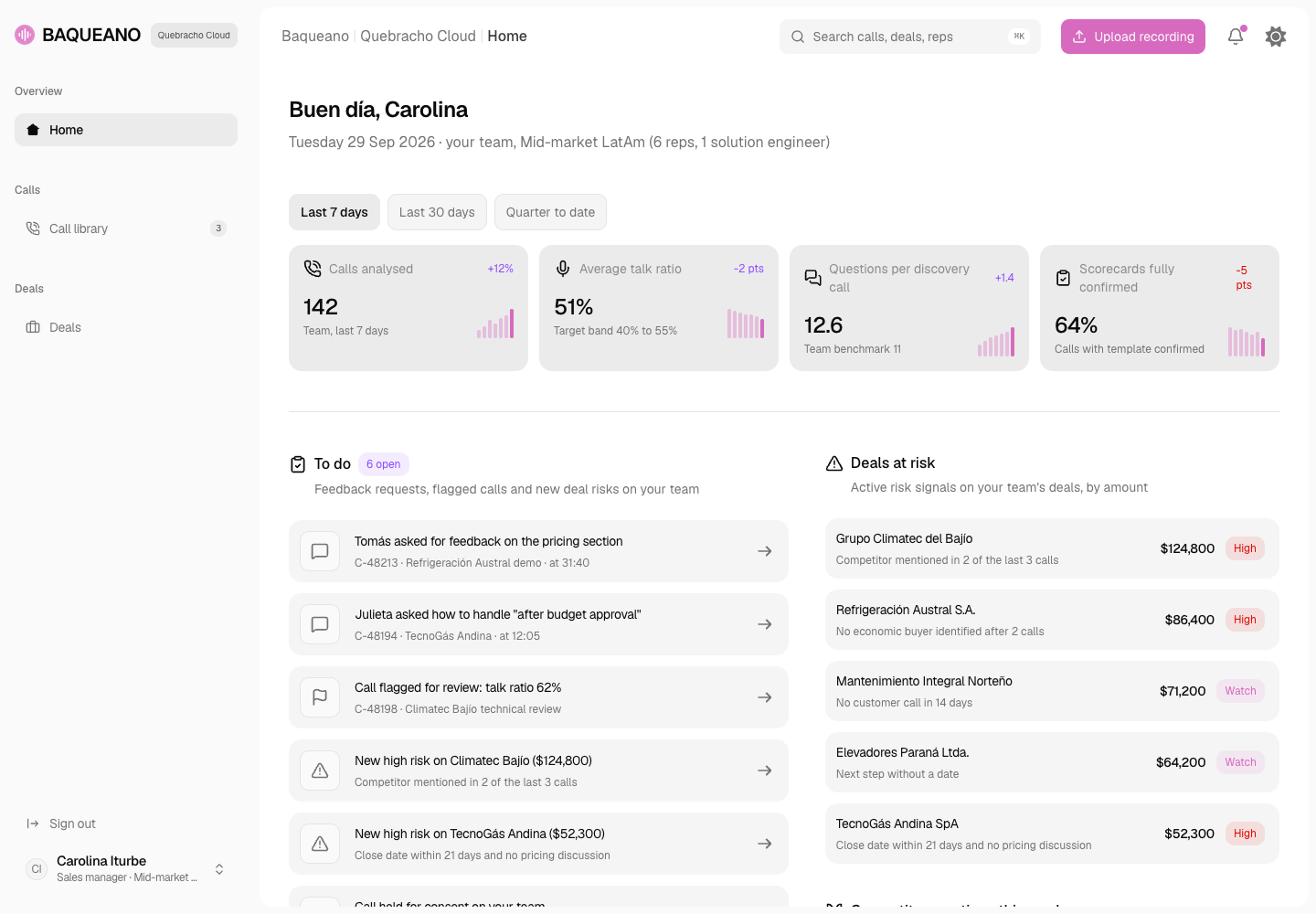
Baqueano - Sales Call Analyser with Consent Rules Built In
Designed and built a clickable sales call analyser for a Buenos Aires SaaS company selling in Spanish, Portuguese and English: one call library across Zoom, Teams, Meet and the dialer, recording rules checked per participant before analysis, AI summaries, talk metrics and MEDDICC or BANT scorecards with evidence, and deals seen through what was said on calls.
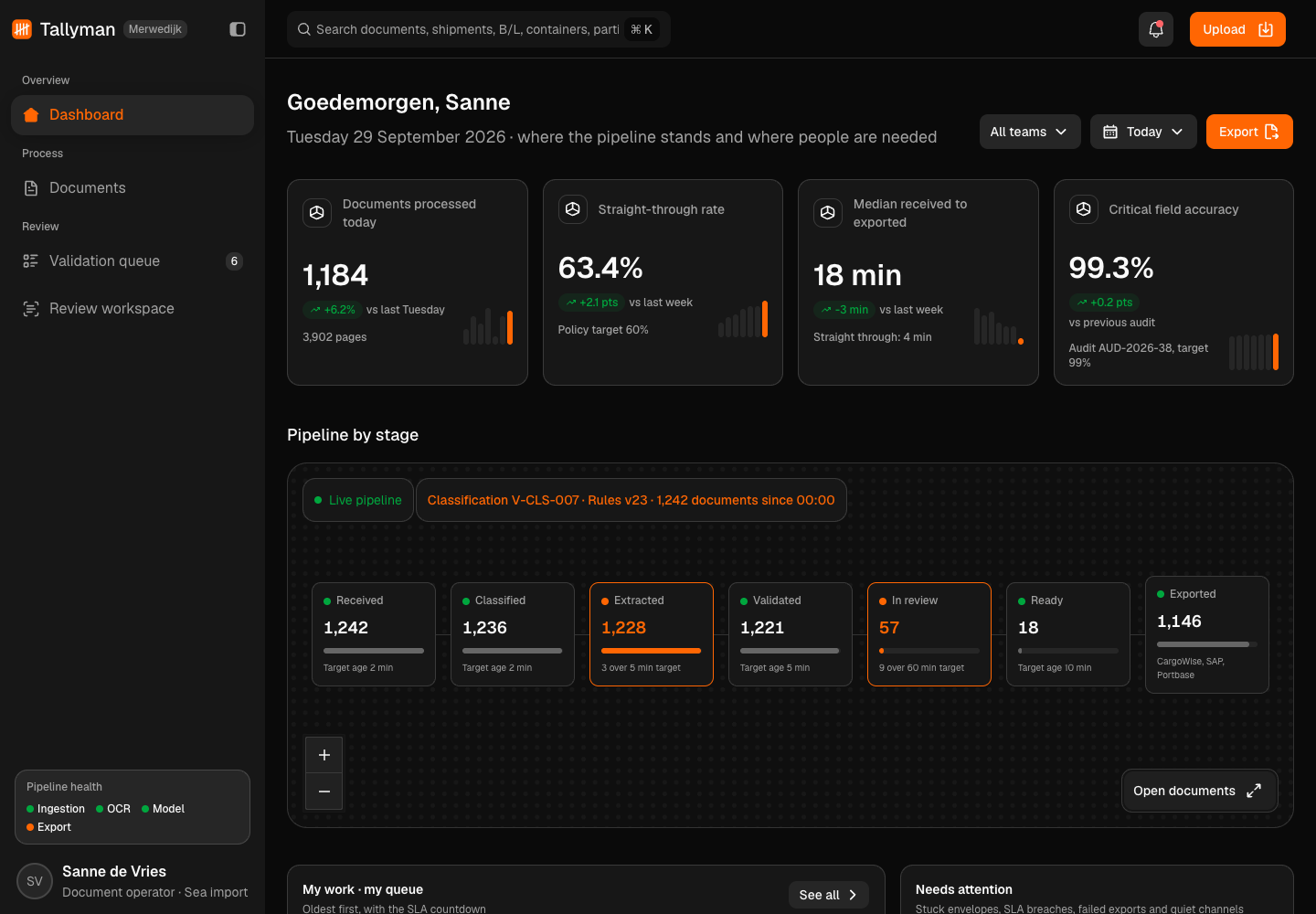
Tallyman - Intelligent Document Processing for Trade and Customs Documents
Designed and built a clickable document processing platform for a Rotterdam freight forwarder and customs representative: it classifies commercial invoices, packing lists, bills of lading, air waybills and certificates of origin, extracts each field with a confidence score, checks it against business rules and sends only the uncertain fields to a person in a side-by-side review workspace.
Enterprise Software Engineering - Human + AI
Contact Us
© 2026 - Copyright. All Rights reserved Oceanlab
Location
Global Headquarters
21 Merchant Road, 3rd Floor, Singapore 058267
Main corporate office and leadership operations
North America Office
548 Market Street, PMB 12345, San Francisco, CA 94104
Client operations and business development
India Office
402 Shivalik Shilp II, SG Highway, Ahmedabad 380015
Engineering and delivery center

Enterprise Software Engineering - Human + AI
Contact Us
Locations
Global Headquarters
21 Merchant Road, 3rd Floor, Singapore 058267
Main corporate office and leadership operations
North America Office
548 Market Street, PMB 12345, San Francisco, CA 94104
Client operations and business development
India Office
402 Shivalik Shilp II, SG Highway, Ahmedabad 380015
Engineering and delivery center
© 2026 - Copyright. All Rights reserved Oceanlab