Quandong - Photo-First AI Nutrition Tracker with Safety Built In
AI Food Diary for an Australian Health App Company
Designed and built a clickable photo-first food diary for a Brisbane consumer health company: snap a meal, the AI finds each food and shows how sure it is, fix anything in two taps, and see kilojoules, macros, fibre and key micros against Australian reference values, with guidance tied to the Australian Dietary Guidelines.
Most of our work is under NDA. Per agreement, we can share the work but not the company details - all names and identifying information shown here have been changed.
Impact
Today, meal detail, photo review, trends and insights. Each of the 11 demo meals and 5 recognised meal photos opens its own page.
Sure from 85%, Likely from 60%, Unsure below. Unsure items are listed first with alternatives to swap in one tap, such as brown rice at 52% next to quinoa and couscous.
A Support options card on every screen opens the Butterfly Foundation helpline, Lifeline 13 11 14, 000 and a safety mode switch. Trends show no streak counter and weight only as weekly averages.
Foods from AFCD, AUSNUT, brand and user-submitted sources, 11 meals, 5 photos with recognition results, 90 days of logs and 10 AI insights citing 7 NHMRC guideline references.
The Problem
Mulga Creek Health's first app was a manual calorie counter built on a US food database. Australians could not find local products, kilojoule values were converted and rounded badly, and logging a home-cooked dinner took five minutes of searching, so most users stopped within two weeks. Support tickets also showed a small number of users, some of them teenagers, setting very low targets and logging in ways that suggested disordered eating, while the app cheered them on.
Our Solution
Quandong makes logging a photo: the AI recognises each food, estimates the portion and shows its confidence, and the user corrects anything in two taps. Every food shows its source, energy is in kilojoules first, guidance cites the Australian Dietary Guidelines, and the product is careful by design: no streaks, no praise for eating less, and support always one tap away.
The Challenge: Fast, Honest and Safe Food Logging
A nutrition app for Australians has to be quick enough that people keep using it, honest about numbers that are only ever estimates, built on local food data, and careful with the people it could harm.
Logging Too Slow to Stick
Searching a database item by item for a home-cooked dinner took minutes. Photo recognition makes it seconds, but only if correcting a wrong guess or a portion is just as fast.
Estimates That Look Like Facts
Portions from a photo can be off by a fair amount, and many foods lack some nutrient values. Showing a confident total, or a missing value as zero, misleads users, and the Australian Consumer Law does not allow misleading accuracy claims.
Local Data, Local Units
Australian labels show energy in kilojoules under the Food Standards Code, and reference data comes from the FSANZ Australian Food Composition Database and AUSNUT. Packaged products, brand data and user submissions each need to be marked as such.
A Product That Could Do Harm
Calorie targets and streaks can feed disordered eating, including in 16 and 17 year olds. Meal photos and diary entries are health information under the Privacy Act 1988, and any disease or medication advice would move the app towards TGA medical device rules.
Our Approach: From Nutrition Rules to a Clickable App
Spec and Rules Research
Mapped 9 roles, from adult and teen app users to partner dietitians, food data editors, AI quality analysts and clinically trained safety reviewers, and 51 screens across the app, dietitian portal and internal console. Defined the data model for foods, nutrient overrides, meals, photos, recognition results, corrections, daily targets, consents, insights and safety cases. Wrote down the rules: FSANZ food data, kilojoules under the Food Standards Code, NHMRC reference values and dietary guidelines, the TGA wellness boundary, the Privacy Act 1988 and the client's eating disorder safety policy.
Clickable Demo on a Production UI Kit
Built 5 key screens of the member app on a production dashboard kit: Today with the energy ring, macros, fibre, key micros in words, meal slots and water, meal detail with recognition boxes and an edit sheet, photo review with Unsure items first and alternative chips, trends over 1 week, 4 weeks and 3 months, and AI insights with citations and feedback. Swaps, portion changes, deletes with undo and saves all run on local state.
What a Production Build Adds
Photo recognition hosted in the Sydney region, AI insights through Anthropic Claude on Amazon Bedrock with guardrails, FSANZ imports, GS1 Australia and Open Food Facts product data, Apple HealthKit and Health Connect, App Store and Google Play subscriptions, and Stripe for dietitian consults. Sign-in with consent capture, audited staff access to health data, and the remaining screens: onboarding with safety screening, barcode scan, search, the dietitian portal and the internal console for food data, model monitoring, insight review and safety signals.
Why It Works: Honest Numbers, Careful by Design
The AI Says How Sure It Is
Every recognised food carries a Sure, Likely or Unsure chip and a box on the photo. Unsure items come first with alternative foods to swap in, a Missing something? row suggests oil, sauce or a drink, and every swap is counted as a correction for the model.
Numbers Read as Estimates
Totals use about wording, such as About 4,500 kJ of about 8,700 kJ, with a note when an item is Unsure. Each food shows its source, AFCD, AUSNUT or brand, and activity energy from Apple Health is shown on its own, never added back to the day.
Guidance With a Source
Today's note and every insight cite the NHMRC guideline they rely on. Insights are labelled as written by AI, checked for safety and not medical advice, and each has helpful, not helpful and This doesn't sound right buttons.
No Guilt, Help Always Visible
Key micros are judged in words, not red and green. Trends show a neutral logging calendar with no streaks and weight as weekly averages with no projection. Support options, with helplines and a safety mode switch, is one tap away on every screen, and meal photos are deleted after 30 days.
Related case studies
View all: Fitness & wearables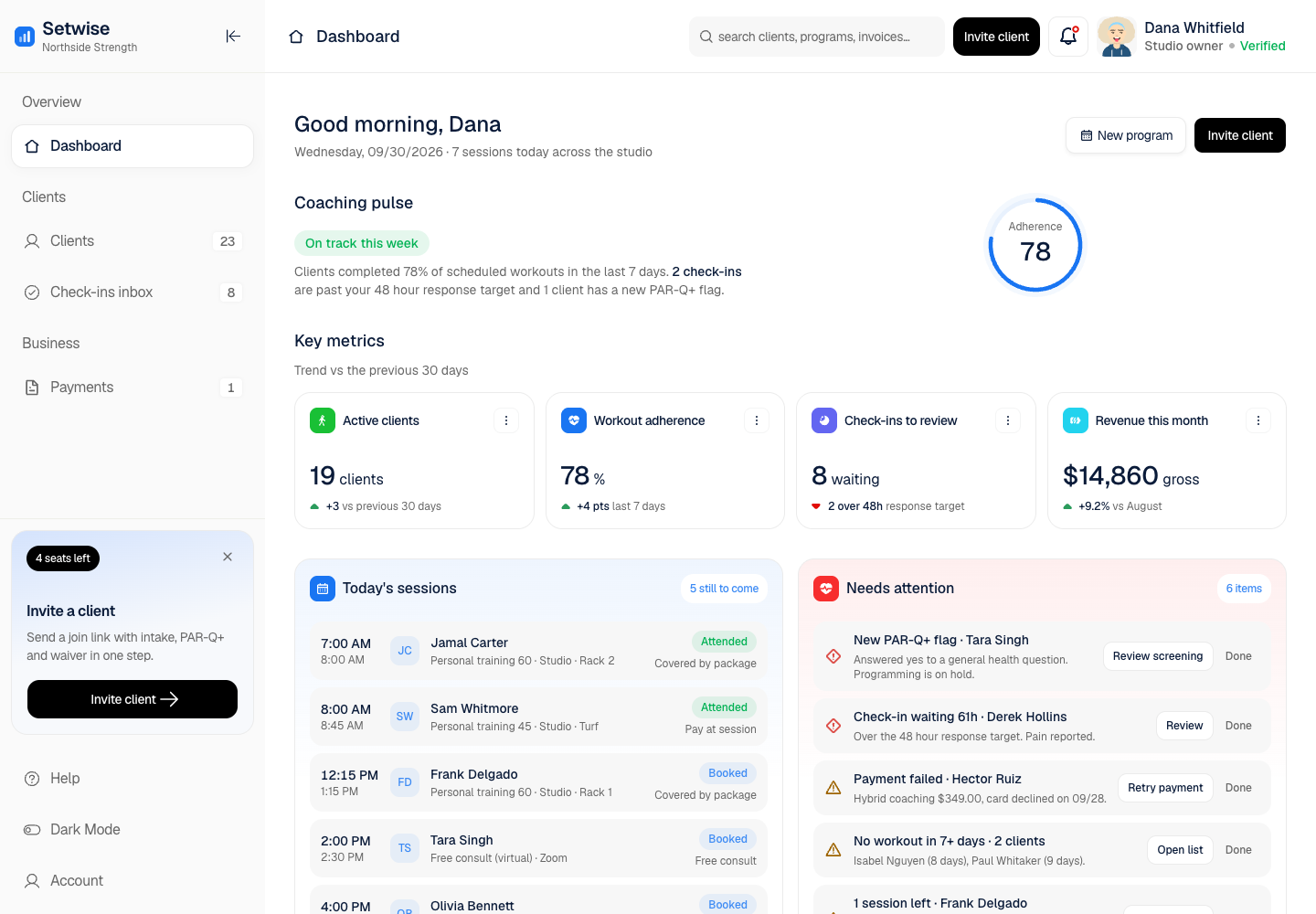
Setwise - Coaching Platform for Personal Trainers with Built-In Health Screening
Designed and built a clickable trainer web app for a US coaching platform: a dashboard of who needs attention today, a client roster with adherence trends, a client record with PAR-Q+ screening and programming holds, a check-ins inbox against a 48 hour response target, and Stripe payments - keeping the product on the coaching side of the line with medical care.
Latu - Wearable Data Dashboard for Endurance Athletes and Coaches
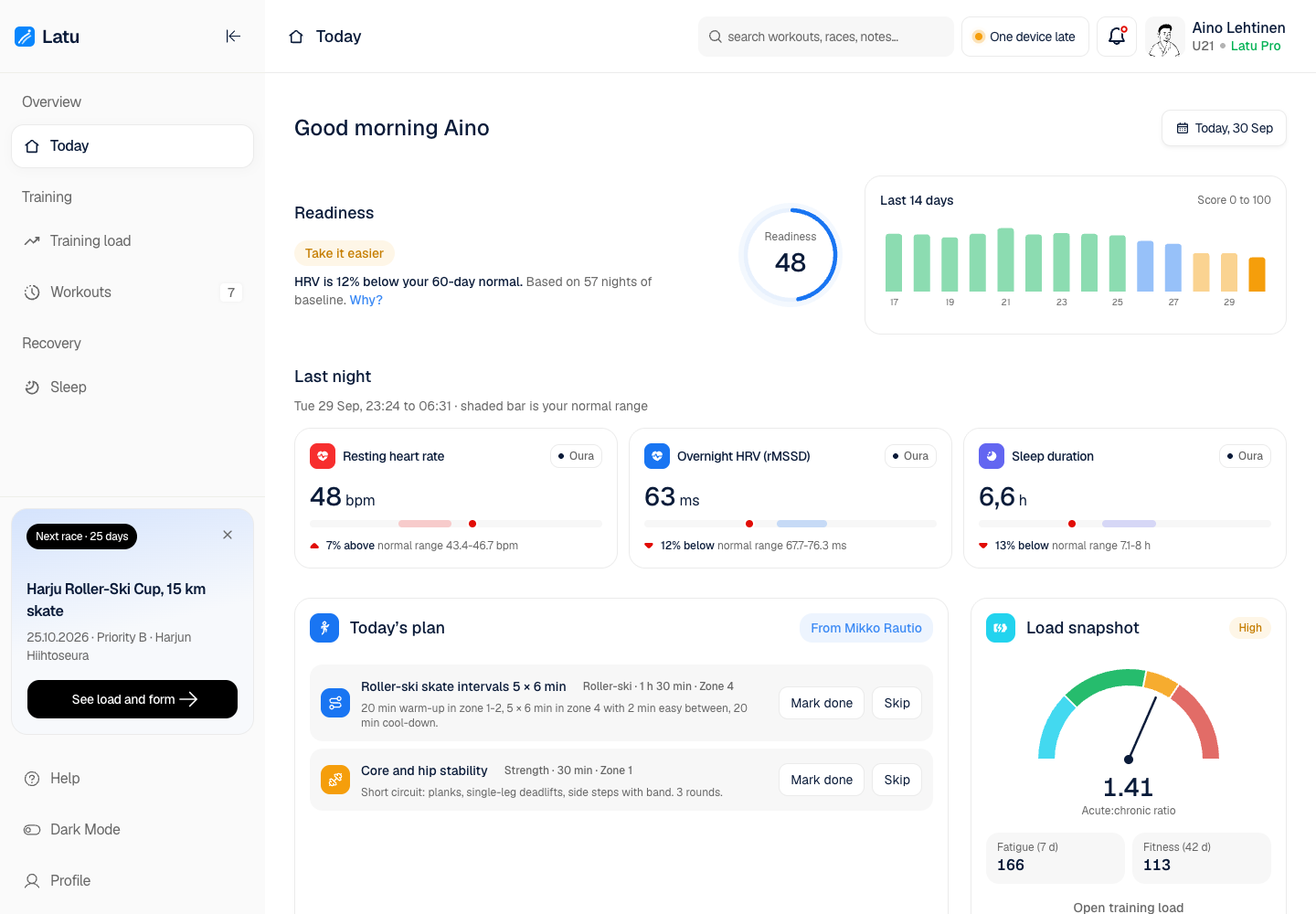
Designed and built a clickable athlete app for a Finnish sports-tech company that joins heart rate, HRV, sleep and training load from several wearables: a daily readiness score that explains itself, training load and fatigue charts, every workout in one list with duplicates merged, and sleep trends against the athlete's own normal range.
Enterprise Software Engineering - Human + AI
Contact Us
© 2026 - Copyright. All Rights reserved Oceanlab
Location
Global Headquarters
21 Merchant Road, 3rd Floor, Singapore 058267
Main corporate office and leadership operations
North America Office
548 Market Street, PMB 12345, San Francisco, CA 94104
Client operations and business development
India Office
402 Shivalik Shilp II, SG Highway, Ahmedabad 380015
Engineering and delivery center

Enterprise Software Engineering - Human + AI
Contact Us
Locations
Global Headquarters
21 Merchant Road, 3rd Floor, Singapore 058267
Main corporate office and leadership operations
North America Office
548 Market Street, PMB 12345, San Francisco, CA 94104
Client operations and business development
India Office
402 Shivalik Shilp II, SG Highway, Ahmedabad 380015
Engineering and delivery center
© 2026 - Copyright. All Rights reserved Oceanlab