Fanous - Brand-Locked Trilingual Landing Page Builder with Approvals
Landing Page Builder for a Beirut University
Designed and built a clickable no-code landing page builder for a private university in Beirut: faculty teams build course, open day and scholarship pages from brand-locked blocks in English, French and right-to-left Arabic, with fees synced from programme data, live quality checks and an approval workflow with versioning and rollback.
Most of our work is under NDA. Per agreement, we can share the work but not the company details - all names and identifying information shown here have been changed.
Impact
Dashboard, pages list with quick view and new page panel, page detail with 7 tabs, the three-column page editor, and approvals with the review panel. Every one of the 25 demo pages opens its own detail and editor.
Each page has English, French and Arabic versions with their own state, path and version number. The Arabic canvas renders right to left, and a translation is flagged out of date when English is approved after it.
Header and footer are locked, colours, fonts and spacing come from the brand kit, and editors change content slots only. Fees, intakes and deadlines are synced from programme data, and overriding one needs a reason and adds admissions to the approval.
Course, open day, scholarship, event and campaign pages across six faculties and central admissions, with 14 programmes, 14 staff users, 12 approval requests, 5 forms and 3 domains.
The Problem
SCU's six faculties each ran their own campaign pages, some on the main CMS, some on a free page builder paid with a faculty card and some as PDF brochures. Logos, colours and tuition figures differed from page to page, Arabic versions were often laid out left to right, two faculties published the wrong scholarship amount for a whole intake, and enquiry forms emailed a shared inbox, so leads reached the admissions CRM days late with no record of consent.
Our Solution
Fanous lets faculty coordinators and the admissions team build pages from approved templates and brand-locked blocks, in three languages with proper right-to-left Arabic. Fees and deadlines come from the programme catalogue, every page carries accessibility, performance and SEO checks, and nothing goes live until the right approvers sign off, with every version kept for one-click rollback.
The Challenge: One Brand, Three Languages, Many Hands
A university that recruits in Lebanon, the Middle East, West Africa and the EU needs pages that are on brand, accurate, accessible and lawful in every language, while the people building them sit in six faculties and the central web team has a three-week queue.
Wrong Numbers on Live Pages
Tuition, intake dates and scholarship amounts were typed by hand on each page. When the catalogue changed, pages did not, and a wrong scholarship amount stayed live for a whole intake.
Arabic That Was Not Really Arabic
Arabic pages need dir="rtl" and lang="ar", a mirrored layout and an Arabic font with proper shaping. A block that cannot mirror cannot be used on an Arabic page, and translations drift when the English version changes.
Consent Across Two Legal Regimes
Lebanon's Law No. 81 of 2018 is the floor, and the GDPR can apply to applicants in the EU. Consent has to be recorded per purpose with the exact wording shown, boxes unticked, and no analytics or advertising tag fired before cookie consent.
Quality and Sign-Off Before Publishing
Every public page must meet WCAG 2.2 AA and a mobile performance budget of 500 KB, and academic content, fees and new forms each need a different approver. Without a workflow, faculties published straight to the web.
Our Approach: From Brand and Consent Rules to a Clickable Builder
Spec and Rules Research
Mapped 9 roles from faculty coordinator and translator to the data protection officer and the visitor, 38 screens including 4 public pages, and the data model for templates, blocks, pages, language versions, forms, consent records, experiments, checks and approvals. Wrote down the rules the design follows: Lebanon's Law No. 81 of 2018, the GDPR for EU applicants, EU ePrivacy cookie consent with Consent Mode v2, WCAG 2.2 AA, right-to-left Arabic, schema.org Course and Event markup and hreflang.
Clickable Demo on a Production UI Kit
Built 5 key screens on a production dashboard kit: the dashboard with consented KPIs, role-based My work and Needs attention, the pages list with language chips and bulk actions, page detail with versions, compare and rollback, the three-column editor with phone, tablet and desktop widths and a right-to-left Arabic canvas, and approvals with diffs, checks and pinned comments. A View as switch shows the product as five different roles, and all actions run on local state.
What a Production Build Adds
Integration with the admissions CRM (such as Slate or Salesforce Education Cloud), Cookiebot or OneTrust, GA4 and ad conversion tags after consent, Cloudflare for domains, images and spam protection, axe-core scans, Lighthouse and CrUX, and Microsoft Entra ID sign-in. An append-only audit log, the form builder and consent log, experiments, privacy requests, settings and the public pages.
Why It Works: Guardrails Built Into Every Page
The Brand Cannot Drift
Editors pick from blocks the template allows, header and footer cannot be moved or deleted, and the inspector shows content slots only. Colours, fonts, spacing and logo come from the pinned brand kit version.
Numbers Come From the Catalogue
Programme facts and fees show "Synced from programme data" with the source and date. An override asks for the new value and a reason, and the change is routed to the admissions officer on approval.
Every Language Has Its Own State
Each version shows its state as an EN, FR or AR chip with an out-of-date dot. Translators can view the English side by side, and the editor opens at 360 px because most visitors arrive on a phone.
Nothing Goes Live Unchecked
Approve stays disabled while blocking accessibility errors exist, waiting times turn amber after one working day and red after two, and the last approver chooses Publish now or Schedule in Beirut time. Rollback needs a reason and only targets a previously approved version.
Related case studies
View all: Marketing & email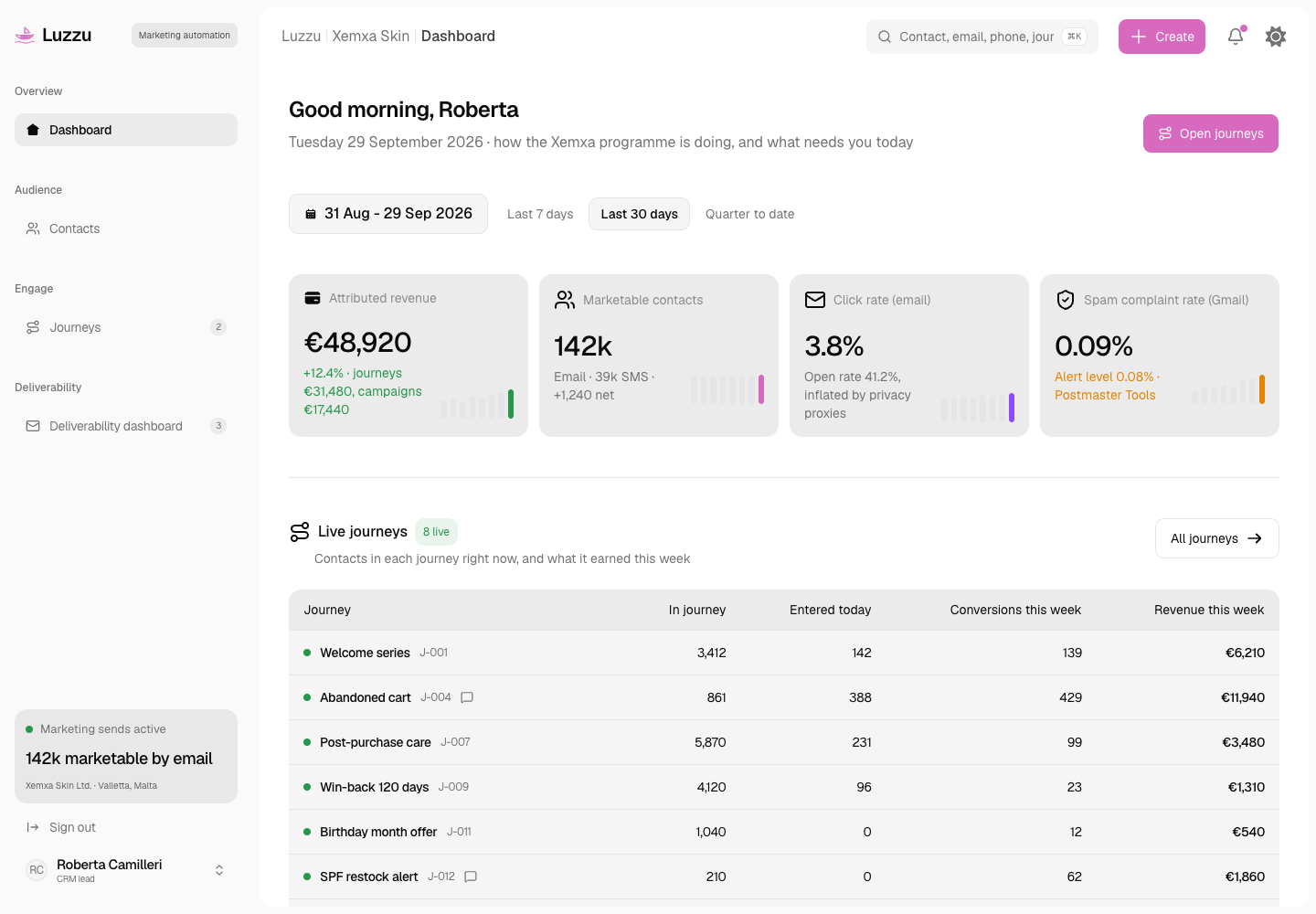
Luzzu - Consent-First Email and SMS Marketing Automation Platform
Designed and built a clickable marketing automation platform for a Malta-based skincare brand selling across the EU: one contact record with provable consent per channel and purpose, welcome, abandoned cart, post-purchase and win-back journeys that respect caps and quiet hours, and a deliverability dashboard that checks the Gmail and Yahoo bulk sender rules.
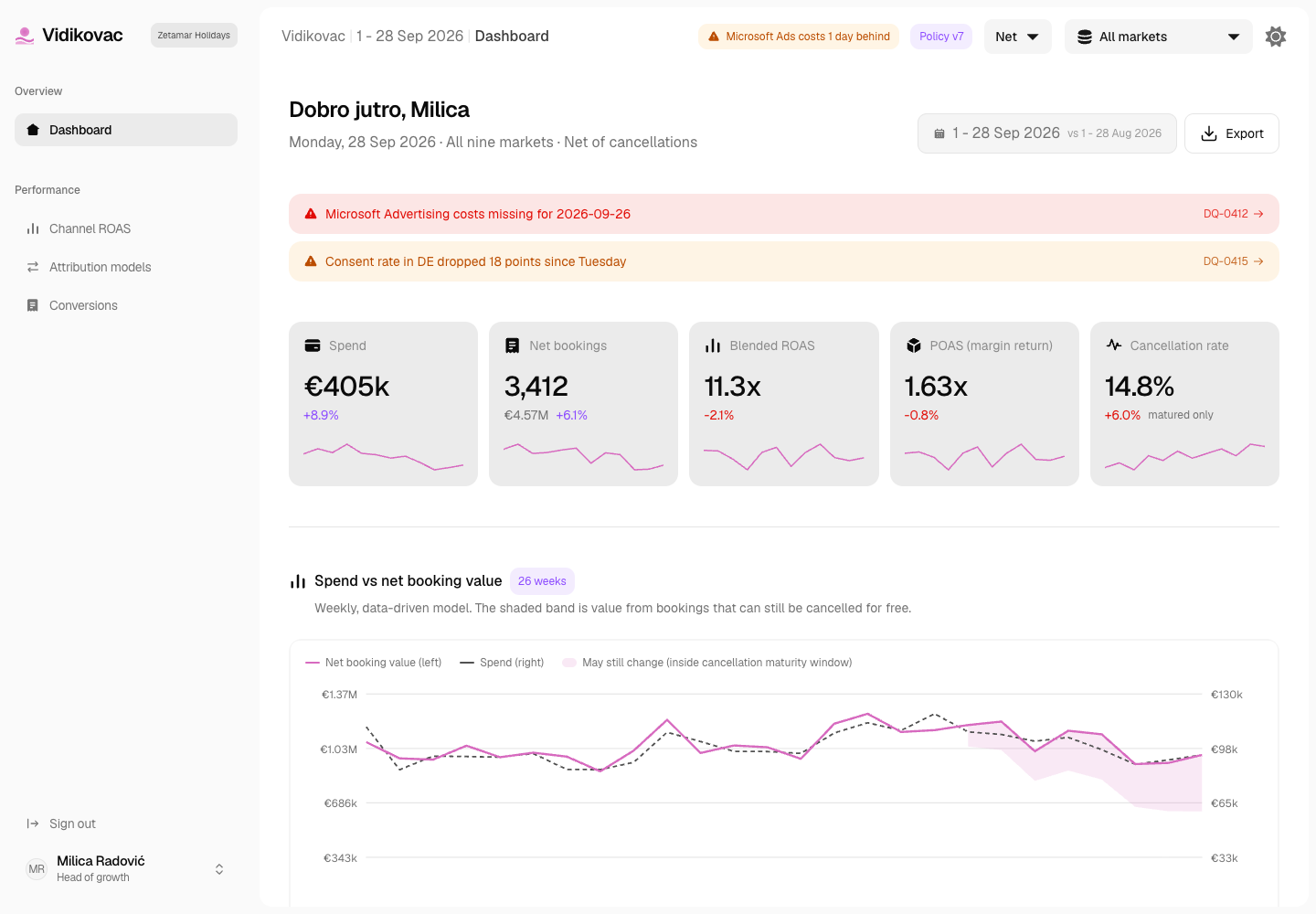
Vidikovac - Consent-Aware Marketing Attribution and Measurement Platform
Designed and built a clickable attribution platform for a Podgorica online travel agency selling Adriatic holidays to EU and UK travellers: last click, position-based and data-driven models side by side and reconciled to the booking engine, return on ad spend counted net of cancellations, and every booking traced back to the consented touchpoints that led to it.
Enterprise Software Engineering - Human + AI
Contact Us
© 2026 - Copyright. All Rights reserved Oceanlab
Location
Global Headquarters
21 Merchant Road, 3rd Floor, Singapore 058267
Main corporate office and leadership operations
North America Office
548 Market Street, PMB 12345, San Francisco, CA 94104
Client operations and business development
India Office
402 Shivalik Shilp II, SG Highway, Ahmedabad 380015
Engineering and delivery center

Enterprise Software Engineering - Human + AI
Contact Us
Locations
Global Headquarters
21 Merchant Road, 3rd Floor, Singapore 058267
Main corporate office and leadership operations
North America Office
548 Market Street, PMB 12345, San Francisco, CA 94104
Client operations and business development
India Office
402 Shivalik Shilp II, SG Highway, Ahmedabad 380015
Engineering and delivery center
© 2026 - Copyright. All Rights reserved Oceanlab